I'm currently looking for a new job, preferably in the Asia-Pacific region but I would consider other regions as well. If you are hiring or have any leads, I would appreciate if you would drop me a message via the
contact form, e-mail (daniel(at)spoodoo.com),
Twitter, or
LinkedIn.
Daniel
-
 Rick
RickGuest
Excellent work on this product! It appears a lot of work has gone into this. In trying to implement this solution I found an issue when in Quick Edit mode, with the first few rows. The highlighted cell appears to be between the actual rows when it is actually referring to the lower row? It almost appears it is off the width of the floating column headers. When moving the cursor down it eventually aligns to the actual row. Is this something that can be adjusted? Any help would be much appreciated! Thank you!
Hi Rick,
Apologies for the late reply. I’ll look into this issue and release a new version if I can fix it. Thanks for reporting!
 Tom
TomGuest
Hi,
We are experiencing issues similar as this, the highlighted cell is not aligning properly on the top or bottom of the quick edit form. Please find screenshot below:
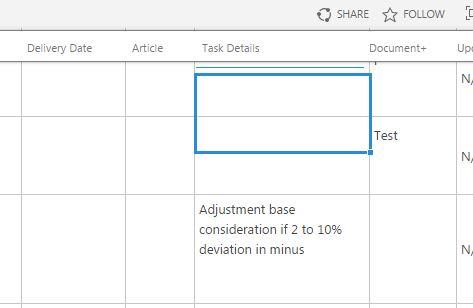
This behaviour is observed in version 3.1.1 of the script.
It will fix itself when you scroll down and back up again, but that’s not really a solution. Is there any possibility this can be looked at?
Thanks!
Hi Tom,
I still can’t reproduce this problem. Do you have any other custom styling or scripts on your page that might interfere with StickyHeaders?
 Clint
ClintGuest
I had this issue for users on Chrome when using jquery 1.12.x. Updating jquery to v3.x fixed it for me.
 MarioB
Guest
Hi,
we have same problem
 Maxime
Guest
Good afternoon,
We have exactly the same issue on our side : the highlighted cell is not always in line with the grid. This is an intermittent problem faced on Chrome browser which is our default config for all of our users.
Stickyheaders is a really nice feature, our users love it, and this is the only irritant that we would like to solve for our users.
Thanks to fix.
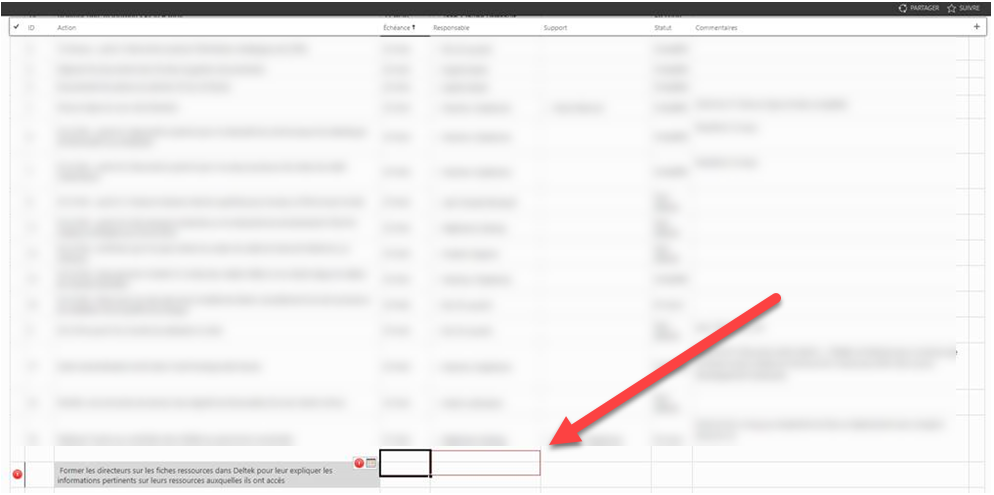
.
